

Accessibility in accordance with Conformity Level AA*

Accessibility in accordance with Conformity Level AA, incl. screen reader support, ARIA implementation, and keyboard accessibility

The event pages and the guest registration process are accessible when using accessible templates (see below).
Event pages and registration forms comply with the requirements of BITV 2.0 and WCAG 2.1 AA. Guests can navigate all content using a keyboard, use screen readers, and choose between color modes such as Dark Mode or high contrast.

*Please note the accessibility guidelines on the respective template page – this explains in detail which features are available for accessible guest registration.

Example page

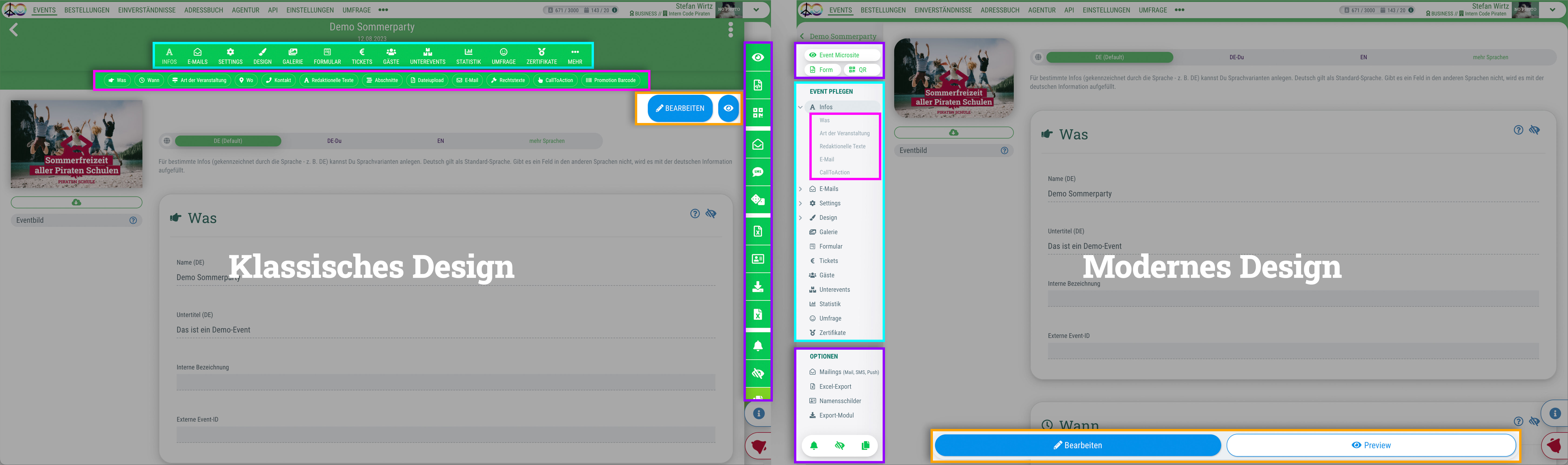
Du kannst für das guestoo Back-End zwischen zwei Darstellungsoptionen wählen. Die Screenshots in der Doku basieren auf dem "Klassischen Design".
Hier siehst Du die Unterschiede, damit Du dich auch im "Modernen Design" zurecht findest: » guestoo Back-End-Design

Accessibility requirements

This is how we've made the registration process for your guests accessible with guestoo

The following factors were relevant to ensuring the best possible accessible guest experience on the event page and in the registration form:

Conformity

  • Compliance with BITV 2.0, WCAG 2.1 AA, EN 301 549
  • We adhere to the European Accessibility Act (EAA)
  • External audit procedures

Technical implementation

  • Full keyboard navigation is available
  • Screen reader compatibility (NVDA, JAWS, VoiceOver tested)
  • Alternative texts, ARIA roles, semantic HTML structure
  • Customizable color schemes (dark mode, high contrast)

Feedback mechanism

  • A separate accessibility statement provided by the organizer for each agency or event
  • Option to report accessibility issues by providing an email address in the accessibility statement
  • Option to report the issue to guestoo support at: support@guestoo.de

How accessible guest registrations work in guestoo

You need to take action!

Since this process requires significant changes to the source code, we cannot simply implement this feature in the existing templates without altering the current designs and design customizations. Therefore, we have decided to provide new templates that can be used when accessible registration is required.

To ensure your guests can register for your event in an accessible manner, our new templates for email and the event page must be used.

These templates are optimized for accessibility according to Conformity Level AA and offer, among other things, screen reader support, ARIA implementation, high contrast, and keyboard accessibility. On the template pages, you can also find out what is not yet accessible (please read):

Existing events can be easily migrated to the new template.

All you need to do is update the template variables (see the template documentation) so that colors and other display options take effect.

That’s why it’s important that you familiarize yourself with the new templates and test them before June. We’ve already released the email template, and the template for the event page will follow in a preview version by mid-May at the latest.

You can find details on this in the template documentation (see above).

Event overview pages

The event overview pages will also gradually become accessible. However, there is currently no set timeline for this.

Accessibility Statement + Reporting Process on your Event Page

You can create an accessibility statement for your agency or event (under Info > Legal Texts) – similar to the legal notice and privacy policy.

You should also include an email address here so that guests who encounter accessibility issues on your event page can contact you.

If the issue is technical in nature, you can report it directly to our support team at support@guestoo.de. If the issue involves insufficient contrast or missing ALT text for images, etc., you will need to address it yourself.

Personal responsibility

We’ve gone to great lengths to set everything up so you can make guestoo as accessible as possible for your guests.

However, since guestoo offers a wide range of settings and gives you complete freedom with the text, we can’t automatically “magic” everything into being accessible. Ultimately, you are responsible for the final check and must ensure, for example, that the colors provide sufficient contrast for high-contrast display, that there are descriptive texts corresponding to the images, that the heading hierarchy (H2, H3, H4) is maintained, and that the correct HTML structure is used in the HTML you create yourself.

Trainings on the topic

The guestoo akademoo

Training dates for accessible registration for your events:
akademoo (» to the appointments)

Report on Non-Accessible Features

You can find a summary of the non-accessible features for an event in the description of the respective templates:

The following general pages are not yet 100% accessible:

The following pages are not relevant for event registration for the vast majority of our customers. Nevertheless, we are working on making them accessible.

  • Event overview pages