Coupons

With guestoo, you can issue discount coupons and gift coupons or make them available for purchase by your customers.
You can easily specify which ticket categories the coupons can be used for.

Please consult with your tax advisor BEFORE using the coupon system to determine whether they approve of it and what adjustments you may need to make to the invoice information.

» Feature > Coupons


General function of coupons


Coupons can be created manually by agency employees for all of an agency's events or purchased by guests.

There are different types of coupons (see below) that either have a specific value or reduce the purchase price by a certain percentage.

If the guest enters a coupon code during the registration process, the amount to be paid is reduced by the value or percentage specified on the coupon.

Managing coupons

Create, search for, view details, edit or delete coupons

How to access the coupon management section

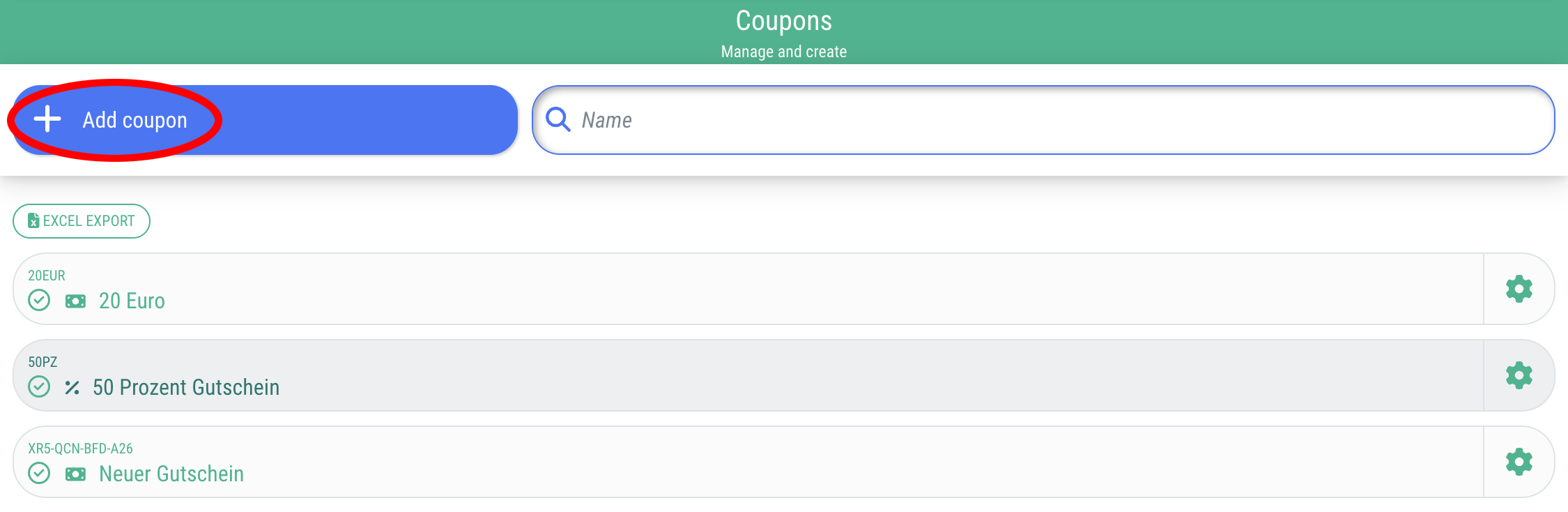
Click on the menu item "Coupons". There you will find an overview of all coupons created so far.

Important: In order for the menu item to be visible, you need to possess the necessary rights within the agency and the agency has to have booked the corresponding  (» to the feature: Coupons).

Search for coupons

You can search for the name of the coupon or the coupon code in the search field.

Edit or delete coupons

By clicking on the gear symbol next to the coupon, you can edit or delete it.

When you edit the coupon, you will also see details about its usage (e. g. remaining value etc.).

Create new coupon

Coupons can be created in two different ways:

Create coupons manually

Create coupons through agency employees

Create coupons manually - Create coupons through agency employees

General procedure

  • In the coupon management section, you can manually create value and percentage coupons using the “+Add coupon” button.
  • The coupon code can then be communicated to the customer(s).
  • This coupon code can be used to purchase tickets within your agency until the monetary value has been used up.
  • In order to redeem the coupon, the guest must enter the coupon code during the ordering process.

This is how you create coupons

  • Click on "+Add coupon"
You can store the following information for a coupon:
Tab "Details"
  • Label: e. g. "Value coupon € 50"
    Will be displayed to the guest during the ordering process when they redeem the coupon
  • Comments: e. g. Promotion 123
    For internal purposes only (will not be displayed to the guest)
  • External ID
    If the coupon comes from other systems, you can store a reference to the other system here
  • Coupon code
    • Generate coupon code automatically
      If you activate this option (=Toggle on green), an automatic coupon code will be generated (XXX-XXX-XXX)
    • Coupon code
      If you deactivate the “Generate coupon code automatically” option (=Toggle on red), you can specify your own coupon code here, e. g. SUMMER25
Tab "Type & value"
  • Typ
    • Value coupon:
      The value of the coupon (€ only) will be deducted from the amount payable. However, the invoice will show the full price including VAT.
    • Marketing coupon:
      Reduces the gross price by % or €. Only the reduced price appears on the invoice.
  • Reduction
    • Percentage discount
      Enter the percentage value here (discount coupon)
      Note: Decimal places are to be indicated with a “.” not a “,”
    • Value discount
      Enter a fixed value here that can be redeemed
      Attention: Marketing coupons with a fixed value may only be used for orders with the same VAT rate, NOT if, for example, some tickets are sold at 19% and others at 7%. Please pay attention to this!
  • Usage
    • Personal

      Personal percentage coupon:
      The coupon code can only be redeemed once

      Personal value coupon:
      The code is valid for one person (the first person to redeem it). The remaining value is retained. The coupon can be redeemed multiple times until the value is used up. However, the coupon is not tied to one person - it can also be passed on to someone else.

    • Multiple

      Multiple percentage coupon:
      Can be redeemed multiple times, e. g. 20 times

      Multiple value coupon:
      The coupon code can be redeemed 10 times, for example. Each time it is redeemed, the amount specified above will be deducted. There is no residual value. If the order value is lower than the coupon value, the remainder will expire.

      • Available quantity
      • Redeemability per event
Tab "Settings"
  • Coupon is active
    This option must be activated (=Toggle on green) in order for your guests to be able to use the coupon.
  • Valid categories
    You can assign categories in the “Ticket” tab (Documentation) of the event. The coupon can only be redeemed for tickets that have been assigned these categories.
Tab "Statistics"

Here you can see how often the coupon has been used.

Offer value coupons for purchase

With guestoo, you can offer your guests the opportunity to purchase coupons and use them for specific tickets (e.g. as gifts)

Offer value coupons for purchase - With guestoo, you can offer your guests the opportunity to purchase coupons and use them for specific tickets (e.g. as gifts)

General procedure

  • You create an event where coupons can be purchased. Then you create the corresponding coupons in the "Tickets" tab (Doku) of your event.
  • The guest purchases the coupons and receives a coupon code with the purchase receipt.
  • This coupon code can be used to purchase tickets within your agency until the monetary value has been used up.
  • In order to redeem the coupon, the guest must enter the coupon code during the ordering/registration process.

Offer coupons for purchase

  • Create an event that is used to purchase coupons
    IMPORTANT: The event has to be an event with "paid tickets" (Documentation) AND "automatic invoices" (Documentation) have to be enabled.
    In the billing information for the event selling the coupons, you may need to add a note regarding gift certificates and VAT (see Coupon billing below).
  • In the "Tickets" tab (Documentation) create as many coupon tickets as you want (see below)
  • Share the URL for the event microsite or embed the form on your website

This is how you create tickets as coupons

Event > Tickets > "+ Add ticket" and enter the relevant information:

  • Name: e. g. "Value coupon € 50" 
  • Description: e. g. "Coupon can only be redeemed for regular tickets"
  • Net price: e. g. € 50
    This is the price the guest pays for the coupon.
    Important: Please do not set VAT, as coupons are always sold without VAT. The VAT will be calculated when the coupon is redeemed.
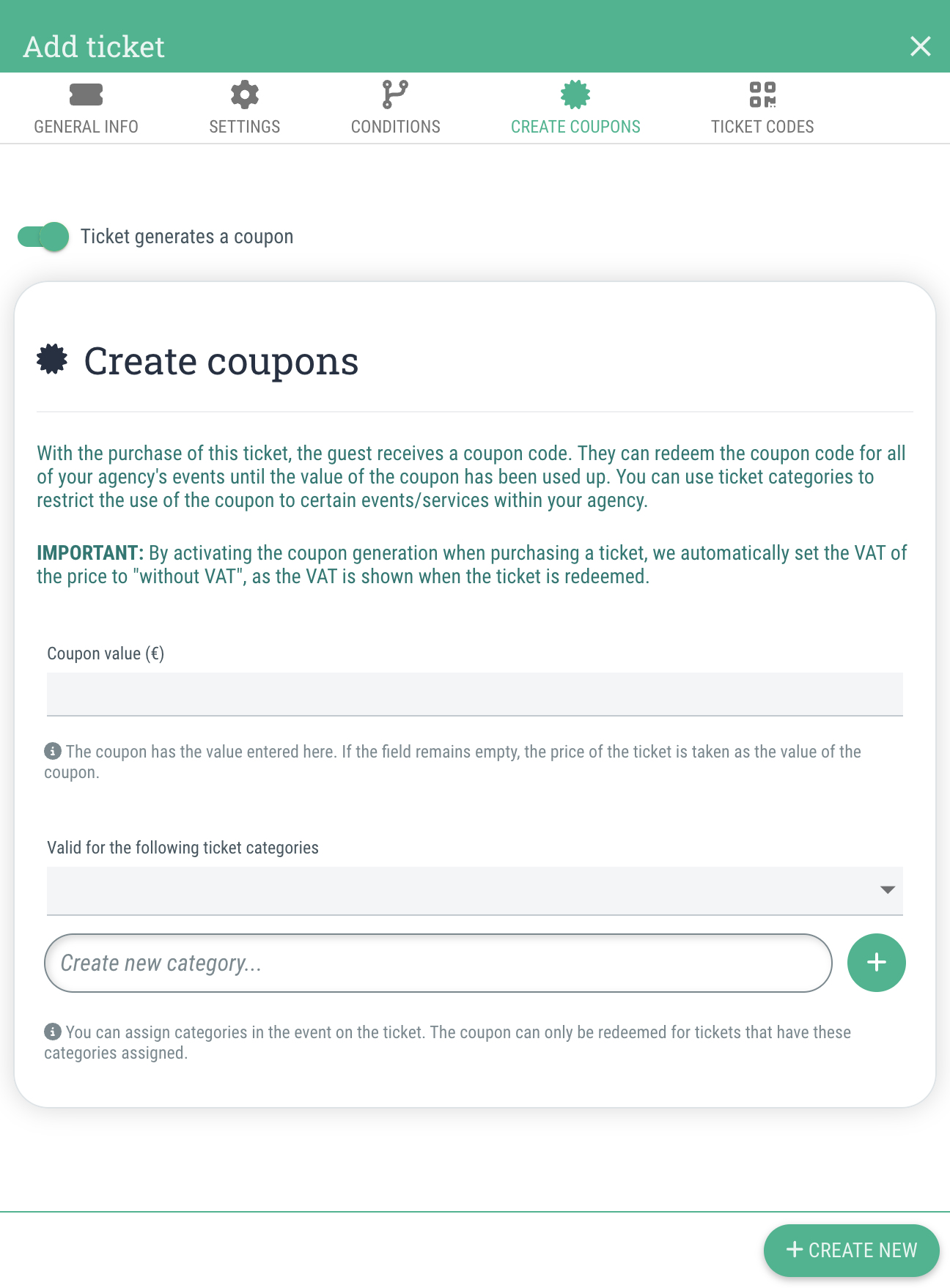
  • Switch to the tab "Create coupons"
  • The option "Ticket generates a coupon" needs to be activated (=Toggle on green)
  • Value of the coupon: e. g. € 50
    The coupon has the value entered here. If the field is left blank, the price of the ticket is set as the value of the coupon (in our example, € 50).
    Tip: You can also set the value as € 60 or any other amount, if you want to grant the buyer a sale by buying the coupon.
  • Valid for the following ticket categories
    You can assign categories to tickets in normal events. The coupon can only be redeemed for tickets that have been assigned to one of these categories.
    This allows you to ensure that the coupon can be used agency-wide, but not for special events or premium tickets, for example.
    You can assign multiple categories to which the coupon should apply.
  • Click on "+Create new"

You have now created a ticket which, once purchased by the guest, automatically generates a coupon. The corresponding coupon code will be sent to the guest in the email containing the purchase receipt.

Exclude certain event tickets from purchase with coupons

You can assign ticket categories to your event tickets. If the ticket category does not match the one approved on the coupon that the guest wants to use, the ticket cannot be paid for with the coupon.

Here's how to assign a category to regular tickets:

  • Click on the ticket
  • Go to the tab "Settings"
  • Scroll down and assign a ticket category
  • Click on "Save" (or "+Create new")

Redeeming the coupon on site or directly when the guest places their order

Payment during the ordering process

If the guest has a coupon code, they can enter it directly during the registration process (below the price table).

Here, they can see how much the coupon reduces the amount to be paid and how much credit remains on the coupon.

Paying on site with the coupon

If the guest has selected the “Payment on site” payment method and has a coupon, the check-in manager can enter the coupon code in the “Paid” dialog box and see whether there is still a balance to be paid or whether everything has been paid.

Multiple coupons per order

Any number of coupons can be redeemed per registration, but only one percentage coupon per order is allowed.

Buy 5 - Pay for 4 / €5 discount for the next event / ...

Interesting use cases that you can implement with the guestoo coupon system

  • Coupon tickets can not only be main tickets, but also additional tickets (with quantity specified).
  • For an event, you can also create a coupon ticket from the normal admission ticket so that guests automatically receive a € 5 coupon for the next event, for example.

Buy 5 - Pay for 4 (e.g. for COVID-19 testing centers)

  • You can also offer discounts by freely entering the price to be paid and the coupon value. For example, “Buy 5 tests and pay for only 4.”
    Example: A coronavirus test costs € 25. The coupon costs € 100 and has a value of € 125. Coronavirus test tickets have a specific ticket category. The coupon is only valid for this category (e.g. coronavirus tests and rapid antigen tests).

Coupons billing and tax details

What happens in the background when coupons are sold and redeemed

Types of coupons that can be created with guestoo

We currently offer two types of coupons:

  • Unspecified value coupons
    that are not explicitly named for a particular item
  • Marketing coupons
    that reduce the purchase price
    (% coupons oder value coupons)

Sale of non-specific value coupons

When a guest purchases a coupon ticket (a ticket that automatically generates a coupon upon purchase and sends the guest the coupon code), an invoice is created (including a new invoice number).

The invoice does not include VAT, as vouchers are always created without VAT. VAT is shown when the voucher is redeemed.

Please check with your tax advisor to find out what information needs to be included on the invoice regarding the purchase of coupons, etc.

Redeeming non-specific coupons

The invoice is issued as follows:

Gross amount: € 119 (including 19% VAT) + € 107 (including 7% VAT) // Voucher: € 20

  • Invoice to the customer
    Gross amount: € 119 + € 107 = € 226 // Net amount: € 100  + € 100 = € 200 // VAT € 19 + € 7 = € 26
  • Amount to be paid
    € 206 (€ 226 gross - € 20 coupon)

Redeeming marketing coupons (percentage coupons and value coupons for discounts)

The invoice is issued as follows:

Example %:

Gross amount: € 119 (incl. 19% VAT) + € 107 (incl. 7% VAT) // Coupon: 10%

  • Invoice to the customer
    » 119 - 10% = € 107,10 gross // € 90 net // € 17,10 VAT
    » 107 - 10% = € 96,30 gross // € 90 net // € 6,30 VAT
    => Total: € 203,40 gross
  • Amount to be paid
    € 203,40

Example of fixed € value


!!!Only works, if the tickets bought all have gthe same VAT rate!!!

Gross amount: € 119 (incl. 19% VAT) // Coupon: € 59,50

  • Invoice to the client
    » € 119 regular price - € 59,50 discount with coupon => € 59,50 gross // € 50,00 net // € 9,50 VAT 
    =>  € 59,50 Total gross
  • Amount to be paid
    € 59,50


The following logic is currently not supported:

Gross amount: € 119 (incl. 19% VAT) + € 107 (incl. 7% VAT) // Coupon: € 50

We first apply the coupon to the items with the highest VAT rate.

  • Invoice to the customer
    » € 119 - € 50 = € 69 gross // € 57,98 net // € 11,02 VAT
    » € 107 - € 0 = € 107 gross // € 100 net // € 7 VAT
    => € 176,00 Total gross
  • Amount to be paid
    € 176,00

Tracking coupons

  • You can find the coupons by searching for the order number in the coupon management
  • (soon) You can find a link to the used coupon at the order that it was used for
  • (soon) You can find a link to the order at the coupon that was used

Häufige Fragen & deren Antworten zum diesem Bereich (FAQ)

  • Can multiple coupons be redeemed during a single registration?

    Value coupons can be redeemed as desired, but only one percentage coupon can be redeemed per registration.